What Are Digital Patient Records?
Digital patient records are electronic versions of a patient's dental and medical information stored within a computerized system.
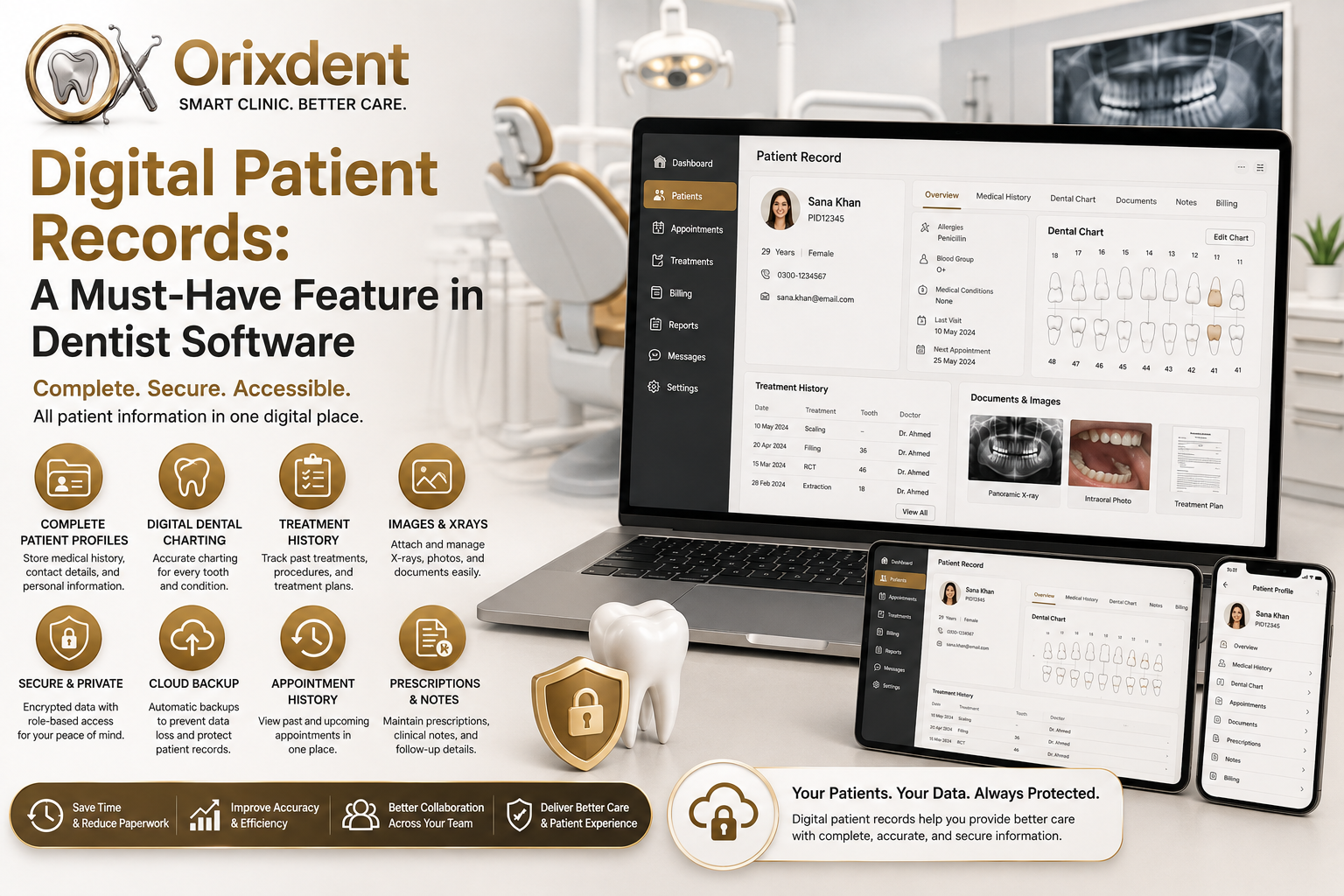
A modern dental software solution can organize information such as:
Patient contact details
Medical history
Dental history
Dental charts
Treatment plans
Clinical notes
Prescriptions
X-rays and dental images
Appointment history
Payment records
Follow-up information
Instead of searching through physical files, dental professionals can find the required information from a centralized digital patient profile.
Why Are Digital Patient Records Important?
Dental clinics handle large amounts of patient information every day. Managing this information manually can create unnecessary administrative work.
Digital records help clinics:
Save time
Reduce paperwork
Improve organization
Minimize data-entry errors
Access information quickly
Improve communication between staff
Support better patient experiences
A well-organized digital record can give dentists a complete view of a patient's history before, during, and after treatment.
7 Benefits of Digital Patient Records in Dentist Software
1. Faster Access to Patient Information
One of the biggest advantages of digital records is speed.
Instead of looking through paper files, staff can search for a patient's profile and quickly access relevant information.
Dentists can review:
Previous treatments
Medical history
Current treatment plans
Prescriptions
Dental charts
Previous appointments
This can make daily clinic workflows much more efficient.
2. Better Patient Care
Accurate information helps dentists make informed decisions.
For example, a patient's previous treatment history can help the dentist understand what procedures have already been performed and what treatments may be required next.
Digital records provide a more complete picture of the patient's dental journey.
3. Easy Dental Charting
Dental charting is an important part of patient record management.
With digital dental charting, dentists can record information about individual teeth, treatments, conditions, and procedures directly within the patient's profile.
This makes records easier to update and review compared with handwritten charts.
4. Secure Storage of Patient Data
Paper records can be damaged by:
Fire
Water
Misplacement
Physical deterioration
Unauthorized access
Digital dentist software can provide security features such as:
User authentication
Role-based access
Data encryption
Secure backups
Controlled permissions
Clinics should select software that follows applicable privacy and data-protection requirements.
5. Better Organization
A growing dental clinic can quickly accumulate thousands of patient files.
Digital records eliminate the need for large physical filing systems and allow information to be organized within searchable patient profiles.
This can make it easier for receptionists, dentists, and authorized staff to find information when needed.
6. Easy Access to Dental Images
Modern dental treatment often involves X-rays and other clinical images.
A digital patient record can keep relevant images connected to the patient's profile, allowing authorized dental professionals to review them alongside treatment information.
This reduces the need to search through separate physical files or disconnected storage systems.
7. Improved Follow-Up and Continuity of Care
Dental treatment often requires multiple visits.
Digital records allow the clinic to maintain a history of:
Previous appointments
Completed treatments
Pending procedures
Follow-up requirements
Treatment progress
This makes it easier for the dental team to maintain continuity throughout the patient's treatment journey.
What Should Dentist Software Include?
When choosing dentist software, clinics should look for comprehensive patient-record features.
Essential Features Include:
Patient Profiles
Store complete patient information in one place.
Digital Dental Charts
Record tooth conditions, procedures, and treatment information.
Treatment History
Track completed and ongoing treatments.
Clinical Notes
Allow dentists to document observations and treatment details.
Prescription Management
Maintain prescription information within the patient record.
Document & Image Management
Keep relevant X-rays, scans, and documents associated with the patient profile.
Appointment History
View previous and upcoming appointments.
Role-Based Access
Control which staff members can access different types of information.
Backup & Security
Protect patient information against accidental loss and unauthorized access.
How Orixdent Supports Digital Patient Records
Orixdent is designed to help modern dental clinics manage patient information through a centralized digital platform.
Its patient management capabilities can bring important information together, including:
Patient profiles
Medical and dental history
Digital dental charts
Treatment plans
Clinical notes
Prescriptions
Appointment history
Billing information
Reports
Dental images and documents
By keeping these records organized in one system, Orixdent helps dental teams spend less time searching for information and more time focusing on patients.
Digital Records and Cloud Dental Software
When digital patient records are combined with cloud-based dentist software, clinics can benefit from greater accessibility and centralized management.
Depending on the software configuration and permissions, authorized users can access patient information across supported devices and locations.
Cloud-based systems can also provide features such as:
Automatic backups
Software updates
Centralized data
Multi-location support
Secure remote access
Clinics should always verify the provider's security, backup, privacy, and compliance practices before choosing a cloud solution.
How Digital Records Improve the Patient Experience
Patients expect modern healthcare services to be convenient and organized.
Digital records can contribute to a better experience by helping clinics:
Reduce waiting times
Quickly retrieve previous records
Maintain accurate treatment information
Coordinate follow-up visits
Avoid repeatedly asking for the same information
A smoother administrative process allows dental professionals to focus more attention on patient care.
Tips for Moving From Paper to Digital Records
If your clinic is still using paper files, transitioning to digital records can be done gradually.
Step 1: Choose the Right Dentist Software
Select a system that supports your clinic's workflow and patient-record requirements.
Step 2: Organize Existing Records
Review your paper files and determine which information needs to be digitized first.
Step 3: Train Your Team
Make sure dentists, receptionists, and other authorized staff understand how to use the system.
Step 4: Establish Access Controls
Give staff appropriate permissions based on their responsibilities.
Step 5: Maintain Regular Backups
Ensure your chosen system has a reliable backup strategy.
Step 6: Protect Patient Privacy
Follow applicable privacy and healthcare data requirements when storing and accessing patient information.
Conclusion
Digital patient records are a must-have feature in modern dentist software. They help dental clinics organize patient information, improve accessibility, streamline workflows, and support a more efficient patient experience.
Moving from paper files to a comprehensive digital system can also prepare a dental practice for future technologies such as cloud management, automation, analytics, and AI-assisted workflows.
With its centralized patient management and dental practice features, Orixdent helps modern dental clinics move toward a more organized, efficient, and digitally connected practice.