What Is Dentist Software?
Dentist software is a digital platform designed to help dental professionals manage their clinical and administrative operations.
Depending on the solution, it can include tools for:
Patient management
Appointment scheduling
Digital dental records
Dental charting
Treatment planning
Billing and invoicing
Reports and analytics
Staff management
Communication
Data security
Instead of using multiple systems or paper files, a complete dental software solution can centralize these processes.
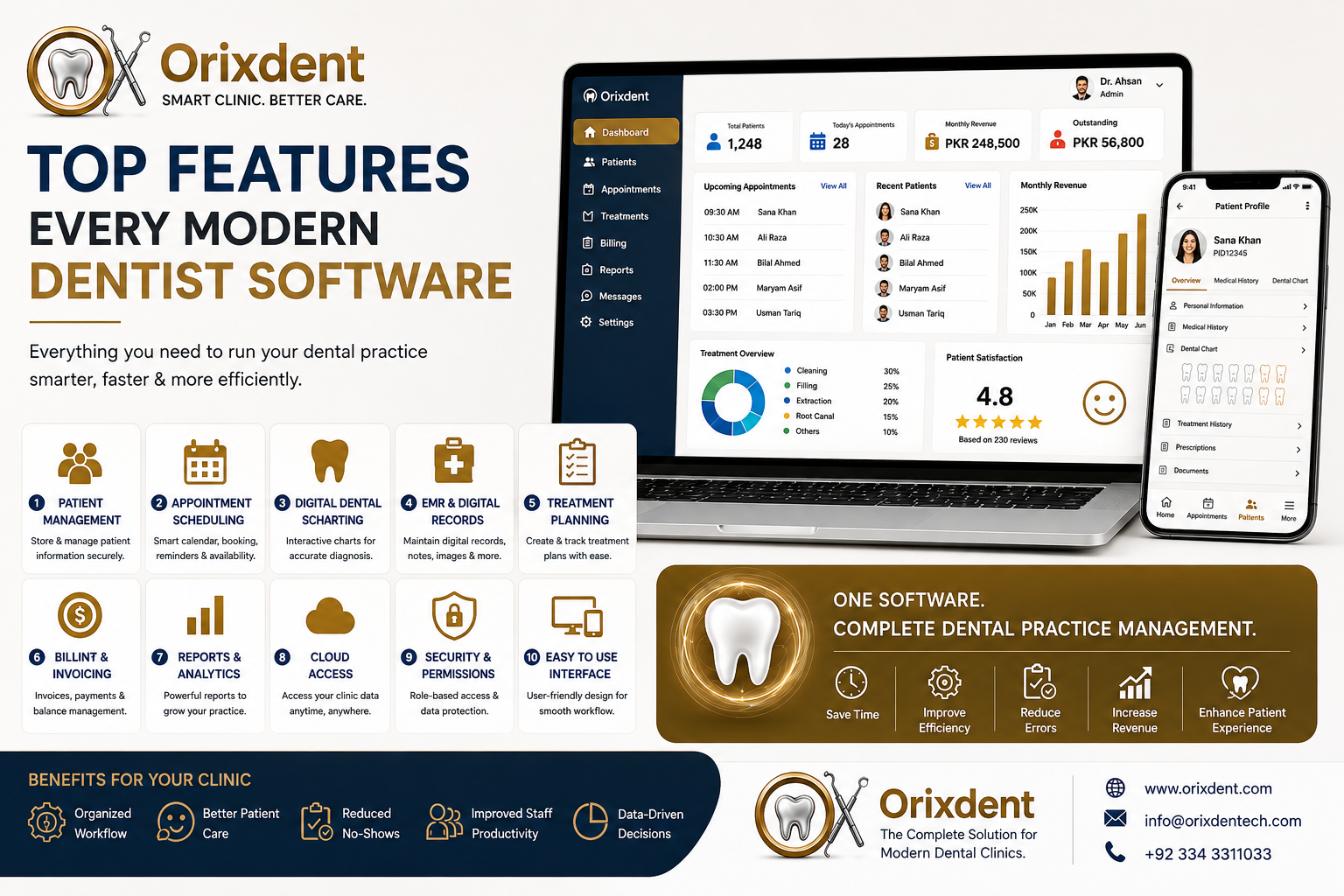
10 Top Features Every Modern Dentist Software Should Have
1. Complete Patient Management
Patient management is one of the most important features of any dental software.
A modern system should allow clinics to create comprehensive patient profiles containing:
Personal information
Contact details
Medical history
Dental history
Treatment history
Clinical notes
Prescriptions
Documents
Dental images
Having all this information in one place makes it easier for authorized staff to retrieve and update patient records.
2. Smart Appointment Scheduling
A busy dental clinic needs an efficient scheduling system.
Modern dentist software should provide a centralized calendar that allows staff to:
Book appointments
Reschedule visits
Cancel appointments
Check dentist availability
Manage multiple dentists
Track appointment history
Send reminders
An organized scheduling system can reduce administrative work and help clinics manage their time more effectively.
3. Digital Dental Charting
Dental charting is essential for recording the condition and treatment of individual teeth.
Modern dental software should provide digital charting tools that allow dentists to record:
Tooth conditions
Existing treatments
Dental procedures
Treatment progress
Clinical observations
Digital charts are easier to update, search, and review than traditional handwritten charts.
4. Electronic Medical Records (EMR)
A strong dental EMR system should provide a complete digital record of each patient's dental journey.
It should support information such as:
Medical history
Dental history
Diagnoses
Treatment plans
Clinical notes
Prescriptions
X-rays and images
Previous appointments
This gives dentists quick access to relevant information when treating patients.
5. Treatment Planning
Treatment planning helps dentists organize current and future procedures.
A useful system should allow dental professionals to:
Create treatment plans
Record proposed procedures
Track completed treatments
Monitor pending treatments
Record treatment costs
Review treatment history
This can improve communication between dentists, staff, and patients.
6. Billing and Invoicing
Financial management is another essential part of running a dental practice.
Dentist software should make it easy to:
Create invoices
Record payments
Track outstanding balances
Generate receipts
Monitor revenue
Review financial reports
Connecting billing with patient and treatment information can also reduce duplicate data entry.
7. Reports and Analytics
Data can help dental clinic owners understand how their practice is performing.
Modern dentist software should provide reports for areas such as:
Revenue
Appointments
Patient growth
Treatments
Payments
Outstanding balances
Staff activity
Analytics can help clinic managers identify trends and make more informed business decisions.
8. Cloud Access
Cloud-based dentist software provides flexibility that traditional desktop systems may not offer.
Depending on the provider and configuration, authorized users can access clinic information from supported devices and locations.
Cloud software can provide:
Remote access
Automatic updates
Centralized data
Automatic backups
Multi-location support
Real-time synchronization
For growing practices, these capabilities can make managing operations more convenient.
9. Security and User Permissions
Dental clinics manage sensitive patient information, so security should be a priority.
Modern dentist software should include appropriate security controls such as:
Secure login
Role-based access
Data encryption
User permissions
Activity tracking
Regular backups
Different staff members should only have access to the information and features required for their responsibilities.
10. Easy-to-Use Interface
Even powerful software isn't useful if it's difficult to operate.
A modern dentist software platform should have a clean and intuitive interface that allows staff to quickly find:
Patients
Appointments
Treatment records
Billing information
Reports
Clinic settings
A user-friendly design can reduce training time and help staff adopt the system more effectively.
Additional Features to Look For
Depending on the size and requirements of your dental practice, you may also want:
Patient Communication
Automated reminders and communication tools can help clinics stay connected with patients.
Multi-Clinic Management
Useful for dental groups and practices with multiple branches.
Document Management
Store important documents and clinical images alongside patient records.
Prescription Management
Maintain organized prescription information within the patient's digital profile.
Staff Management
Manage staff roles, schedules, permissions, and productivity.
Backup and Recovery
Reliable backups help protect important clinic information from unexpected data loss.
Benefits of Using Complete Dentist Software
A comprehensive dental management system can help clinics:
Reduce paperwork
Save administrative time
Improve patient record organization
Simplify appointment scheduling
Improve billing management
Reduce duplicate data entry
Monitor clinic performance
Improve staff productivity
Enhance patient experience
The biggest advantage comes when these features work together rather than operating as separate systems.
Why Integrated Dental Software Is Better
Imagine a patient books an appointment.
With an integrated system, the workflow can look like:
Appointment → Patient Record → Dental Chart → Treatment Plan → Billing → Follow-Up
When these areas are connected, staff don't need to enter the same information repeatedly into different systems.
This can make the clinic workflow faster and more organized.
Why Choose Orixdent?
Orixdent is designed as a complete dental practice management solution for modern dental clinics.
It brings essential functions together, including:
Patient Management
Appointment Scheduling
Digital EMR
Dental Charting
Treatment Management
Billing & Invoicing
Reports & Analytics
Secure Access
Cloud-Based Management
Multi-Clinic Support
With these tools in one platform, Orixdent can help dental teams manage everyday operations more efficiently while keeping patient information organized.
How to Choose the Right Dentist Software
Before selecting a dental management system, consider the following:
1. Clinic Size
Choose software that can support your current number of dentists, staff, and patients.
2. Required Features
Make a list of essential functions such as EMR, charting, scheduling, billing, and reporting.
3. Ease of Use
Ask whether dentists and staff can learn the system quickly.
4. Security
Review how patient information is stored, protected, backed up, and accessed.
5. Scalability
Make sure the software can support your clinic if you add more dentists or branches.
6. Support
Reliable technical and customer support is important when introducing new software to your practice.